> For the complete documentation index, see [llms.txt](https://cmp.docs.sirdata.net/llms.txt). Markdown versions of documentation pages are available by appending `.md` to page URLs; this page is available as [Markdown](https://cmp.docs.sirdata.net/en/faq/cancellation.md).
# Cancellation
## Cancellation Procedure & Deactivation ABconsent CMP
To ensure the effective termination of billing and avoid costs related to residual calls (hits), a technical deactivation procedure must be strictly followed.
> A simple cancellation notice by email does not cut off technical data flows. As long as the script is present on your site and the configuration is "Live," generated hits will continue to be counted and invoiced.
### 1. Tag Removal (De-tagging)
The first step is to remove the Sirdata source code from your digital environment to prevent user browsers from continuing to call our servers.
* **Hard-coded Integration:** Remove the code from the `` section of your website.
* **Google Tag Manager (GTM):** Pause or delete the Sirdata tag, then publish the new version of your GTM container.
### 2. Technical Deactivation in the Interface
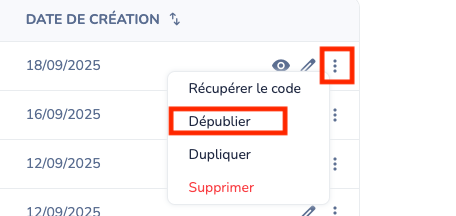
To permanently stop communication between your domain and the Sirdata infrastructure, you must unpublish your configuration.
#### Steps to follow:
1. Log in to your [Sirdata Dashboard](https://www.abconsent.com/sites/configurations).
2. Go to the section for your product (e.g., **My CMP Configurations**).
3. Locate the relevant configuration.
4. Click on the **More Actions** menu (...).
5. Select **Unpublish**.
***
### Consequences of Unpublishing
* **Immediate Stop of Hits:** No further calls are processed by our servers, thus stopping usage-based billing.
* **Service Inaccessibility:** If the script remains on your site after unpublishing, the CMP (or DMP) will no longer load. This may block your tracking tags (Google Ads, Meta, Bing) that depend on consent signals.
* **Configuration Status:** A "Published" configuration remains active and billable. Only the "Unpublished" status guarantees the total termination of the SaaS service.
---
# Agent Instructions
This documentation is published with GitBook. GitBook is the documentation platform designed so that both humans and AI agents can read, navigate, and reason over technical content effectively. Learn more at gitbook.com.
## Querying This Documentation
If you need additional information that is not directly available in this page, you can query the documentation by asking a question.
Perform an HTTP GET request on the following URL with the `ask` and `goal` query parameters:
```
GET https://cmp.docs.sirdata.net/en/faq/cancellation.md?ask=&goal=
```
`ask` is the immediate question: it should be specific, self-contained, and written in natural language.
`goal` is what the user is ultimately trying to achieve, the reason they need the answer. Sharing it helps GitBook give you a better, more relevant answer. A goal is most helpful when it describes the outcome the user wants rather than restating the question. For example, with `ask=how do I create an API token`, a goal like `automate deployments from our CI pipeline` lets GitBook tailor the answer to that use case.
The response will contain a direct answer to the question and relevant excerpts and sources from the documentation.
Use this mechanism when the answer is not explicitly present in the current page, you need clarification or additional context, or you want to retrieve related documentation sections.