> For the complete documentation index, see [llms.txt](https://cmp.docs.sirdata.net/llms.txt). Markdown versions of documentation pages are available by appending `.md` to page URLs; this page is available as [Markdown](https://cmp.docs.sirdata.net/en/advanced-features/tcf-publisher-restrictions.md).
# TCF Publisher Restrictions
Impose a legal basis on a TCF vendor, or forbid it a purpose, with the standard Publisher Restrictions mechanism.
## Definition
In IAB Europe's Transparency & Consent Framework (TCF), each vendor declares, in the Global Vendor List (GVL), the purposes it pursues and the legal basis it uses for each of them: consent or legitimate interest. A purpose may also be declared **flexible**: the vendor has a default legal basis, but accepts that the publisher imposes the other one.
**Publisher Restrictions** are the TCF's standard mechanism that lets you, as a publisher, restrict what a vendor is allowed to do on your site. For one purpose and one or several vendors, three restrictions are available:
| Restriction | Effect for the vendors concerned |
| ------------------------------------------ | ----------------------------------------------------------------------------------------------------------------------------------------------------------------------------------------------------------------------- |
| **Not allowed** | The purpose is removed for this vendor: the CMP no longer displays it for the vendor and transmits no legal basis. |
| **Use consent as legal basis** | The purpose, declared under legitimate interest by the vendor, is requested under consent. Only works if the vendor declared the purpose as flexible; otherwise the purpose is simply removed for this vendor. |
| **Use legitimate interest as legal basis** | The purpose, declared under consent by the vendor, moves to legitimate interest. Same flexibility conditions. TCF policies forbid legitimate interest on purposes 1, 3, 4, 5 and 6: the CMP ignores such a restriction. |
The restriction is reflected in the CMP user interface and encoded in the TC String sent to every vendor. The TCF requires CMPs to support this mechanism: it is available in every compliant CMP.
{% hint style="info" %}
A restriction only concerns TCF vendors (Global Vendor List). It has no effect on non-TCF partners or on Google Additional Consent providers.
{% endhint %}
## When to use it
The most common case: a vendor declares a purpose under legitimate interest while your implementation expects consent for that purpose, for instance a tag condition that tests purpose 2 in the consent vector. By imposing consent on that vendor, the purpose is again present in the consent vector when the user accepts it.
{% hint style="warning" %}
First check that the vendor declares the purpose as **flexible** in the GVL. A "Use consent" restriction on a non-flexible purpose removes the purpose for that vendor instead of changing its legal basis.
{% endhint %}
## Enabling a restriction
From the [abconsent](https://www.abconsent.com/) portal, open the configuration concerned in **My CMP configurations**, then the **Purposes** step.
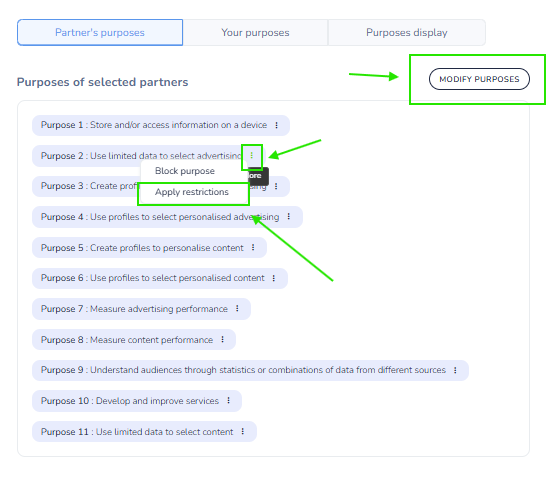
**Step 1.** In the **Partner's purposes** tab, click **Modify purposes**. On the row of the purpose to restrict, open the actions menu (⋮) and choose **Apply restrictions**. The "Restrictions for the Purpose N" panel appears.
"Modify purposes", then "Apply restrictions" on purpose 2
**Step 2.** In that panel, click **Add a restriction**.
The "Restrictions for the Purpose 2" panel
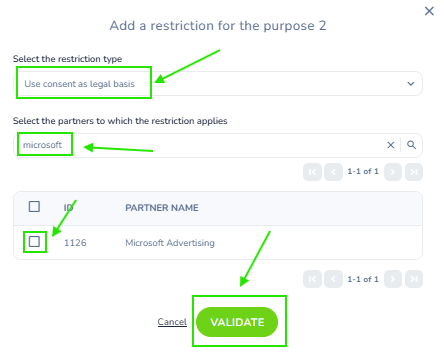
**Step 3.** In the "Add a restriction for the purpose N" window:
* select the **restriction type**;
* search for the vendor(s) concerned, by name or TCF ID, and tick them;
* click **Validate**.
Consent imposed on Microsoft Advertising (1126) for purpose 2
**Step 4.** Save the configuration.
The vendors offered depend on the restriction type: for "Use consent", only vendors declaring the purpose under legitimate interest are listed; for "Use legitimate interest", only those declaring it under consent. Only the vendors of your configuration appear.
{% hint style="info" %}
The "Only allow consent as a legal basis for processing" checkbox, at the top of the Purposes step, imposes consent on **all** vendors for **all** their flexible purposes. It is strongly discouraged: prefer a restriction targeted at one vendor and one purpose.
{% endhint %}
## Propagation and existing choices
The change is delivered with the usual cache delay of the CMP scripts, within one hour at most (see [Sirdata Script Cache Management](/en/install/cache-systems-exclusion/sirdata-script-cache-management.md)).
Choices already recorded by your visitors are not modified. A visitor whose choice contains no consent for the purpose concerned will be shown the CMP again once the delay set by your **display rules** (Settings step of the configuration) has elapsed.
## Checking
The restriction is visible in the `TCData` object of the `__tcfapi` API, under `publisher.restrictions`, keyed by purpose ID then by vendor ID, with the restriction type as value: `0` not allowed, `1` consent required, `2` legitimate interest required.
```javascript
window.__tcfapi('getTCData', 2, function (tcData, success) {
if (!success) return;
console.log(tcData.publisher.restrictions); // e.g. { "2": { "1126": 1 } }
console.log(tcData.purpose.consents[2]); // true after "Accept all" if the restriction applies
});
```
See [How the CMP API works](/en/cmp-api/how-it-works.md). In mobile apps, the same information is published in the `IABTCF_PublisherRestrictions{ID}` keys (see [Sharing consent with vendor SDKs](/en/mobile-apps-native-sdk/mobile-sdk/sharing-consent.md)).
## Example: Microsoft Advertising and purpose 2
Microsoft Advertising (TCF vendor 1126) declares purpose 2, "Use limited data to select advertising", under legitimate interest, as a flexible purpose.
If Microsoft Advertising is the only vendor in your configuration that uses purpose 2, that purpose is present under legitimate interest, not in the consent vector, after "Accept all". A condition that tests consent for purpose 2 therefore does not fire.
Two possible answers:
* adapt the condition so it does not test consent for purpose 2 (consent for purpose 1 and for the vendor is what is needed to set and read cookies);
* add the **Use consent as legal basis** restriction on purpose 2 for the vendor **Microsoft Advertising (1126)**, as described above.
{% hint style="info" %}
The restriction applies as long as Microsoft Advertising declares purpose 2 as flexible. A condition that does not depend on purpose 2 remains the most durable fix.
{% endhint %}
---
# Agent Instructions
This documentation is published with GitBook. GitBook is the documentation platform designed so that both humans and AI agents can read, navigate, and reason over technical content effectively. Learn more at gitbook.com.
## Querying This Documentation
If you need additional information that is not directly available in this page, you can query the documentation by asking a question.
Perform an HTTP GET request on the following URL with the `ask` and `goal` query parameters:
```
GET https://cmp.docs.sirdata.net/en/advanced-features/tcf-publisher-restrictions.md?ask=&goal=
```
`ask` is the immediate question: it should be specific, self-contained, and written in natural language.
`goal` is what the user is ultimately trying to achieve, the reason they need the answer. Sharing it helps GitBook give you a better, more relevant answer. A goal is most helpful when it describes the outcome the user wants rather than restating the question. For example, with `ask=how do I create an API token`, a goal like `automate deployments from our CI pipeline` lets GitBook tailor the answer to that use case.
The response will contain a direct answer to the question and relevant excerpts and sources from the documentation.
Use this mechanism when the answer is not explicitly present in the current page, you need clarification or additional context, or you want to retrieve related documentation sections.